See http://bit.ly/DataUnlockedTwitter
You can't go wrong with these kinds of discounts.
#DataUnlocked
Tuesday, September 10, 2019

Tuesday, September 3, 2019
Finally Planning the Rewrite of Building Skills in Object-Oriented Design
See Building Skills in Object-Oriented Design for the old content, which has a number of features that hold up well over time.
- A graduated series of exercises to build up large, complete applications is important.
- It covers a lot of skills essential to building real applications -- unit testing, integration, code reuse. I want to expand on this to include more testing strategies, and final documentation.
- It's so popular, I've got enough donations to move forward on a rewrite.
Previously, it was hosted out of my ancient web site as HTML and PDF download. That hasn't aged well.
Also, it was originally Python 2, and that ship sailed years ago.
I'm leaning toward hosting the content on GitHub.
One idea is to have a complex project with the following top-level folders:
- A docs folder that has the HTML as well as PDF (and maybe an ebook format, too.)
- A src folder with seed files for the various packages and modules.
- A tests folder with seed tests.
Someone could fork and then build on the framework.
It's possible to put the exposition into the wiki pages associated with the repo. This has the advantage of keeping the meta-level documentation and individual project requirements separate from the project itself.
Before I go too far, I'll need to experiment a bit to see what the editing process is like. The Github wiki pages are their own git branch, and are easy to edit off-line and push to the repo. Some of the fancy Sphinx markup features vanish, replaced with basic RST. This may not be all bad, since the baseline content is not *very* complex.
Stand by for more.
Tuesday, August 13, 2019
Coping with Windows via AWS
For a training class, I needed to address The Windows Problem™. TWP is the my summary of all the non-standard features of Windows in its various inconsistent incarnations.
Any training class that involves "install Python" inevitably involves at least one Windows user who can't get their PATH set correctly. It's an eternal mystery to me, since the installers all seem to take care of this, but, some people are able to click the wrong thing somewhere in a simple installation.
The uninstall and start again sometimes helps. Having a Windows expert in the room sometimes helps.
(The hapless flailing I sometimes observe is my personal problem to deal with. I should not let myself get short-tempered with people who try things exactly once and then stop, unable to discern a single branch in the path they chose. It's as if the sequence of dialog boxes with different choices never existed for them, and I need to respect the fact that they did not read the messages and did not think of themselves as actively making choices.)
I have to say that being able to get a Windows machine in free tier of AWS is a wonderful resource.
I can screen capture the installation on Windows.
I can narrate the sequence of choices I made. I'm hoping this prevents TWP from side-tracking a person who's struggling with Windows.
I haven't used the movies yet. But it's so handy to be able to spin up a Windows machine in the cloud and run the Conda install. It's a whole lot nicer than buying a throw-away Windows machine to do screen shots on.
Any training class that involves "install Python" inevitably involves at least one Windows user who can't get their PATH set correctly. It's an eternal mystery to me, since the installers all seem to take care of this, but, some people are able to click the wrong thing somewhere in a simple installation.
The uninstall and start again sometimes helps. Having a Windows expert in the room sometimes helps.
(The hapless flailing I sometimes observe is my personal problem to deal with. I should not let myself get short-tempered with people who try things exactly once and then stop, unable to discern a single branch in the path they chose. It's as if the sequence of dialog boxes with different choices never existed for them, and I need to respect the fact that they did not read the messages and did not think of themselves as actively making choices.)
I have to say that being able to get a Windows machine in free tier of AWS is a wonderful resource.
I can screen capture the installation on Windows.
I can narrate the sequence of choices I made. I'm hoping this prevents TWP from side-tracking a person who's struggling with Windows.
I haven't used the movies yet. But it's so handy to be able to spin up a Windows machine in the cloud and run the Conda install. It's a whole lot nicer than buying a throw-away Windows machine to do screen shots on.
Friday, July 5, 2019
Mastering Object-Oriented Python 2nd ed
The book https://www.packtpub.com/programming/mastering-object-oriented-python-second-edition
Some new chapters.
Type hints almost everywhere.
If you want to write a review, DM me on twitter @s_lott I can add you to the list for freebies in exchange for a review.
Thursday, June 20, 2019
HumbleBundle -- Functional Python Programming -- Through July 1
See this https://www.humblebundle.com
This is amazing to me.
Humble Bundle sells games, ebooks, software, and other digital content. Our mission is to support charity while providing awesome content to customers at great prices. We launched in 2010 with a single two-week Humble Indie Bundle, but we have humbly grown into a store full of games and bundles, a subscription service, a game publisher, and more.
Currently, Packt is offering some of my books.
Want a *ton* of technical books and donate to charity?
Click Now. Thank me later.
Tuesday, June 18, 2019
The Pythonista app for iPad
Let me start my review with "wow!"
Python 3.6 on the iPad. Works. Nicely. Easy to use. Reliable. Rock-Solid.
I'm not switching to iPad as my primary platform any time in the near future. But. For certain kinds of small and tightly focused hackery, this is really nice.
I use a bracket to hold the iPad up and an external keyboard. I can be used with the on-screen keyboard, but, that's slow-going for me.
Here's the thing that was exquisitely simple in Pythonista:
Python 3.6 on the iPad. Works. Nicely. Easy to use. Reliable. Rock-Solid.
I'm not switching to iPad as my primary platform any time in the near future. But. For certain kinds of small and tightly focused hackery, this is really nice.
I use a bracket to hold the iPad up and an external keyboard. I can be used with the on-screen keyboard, but, that's slow-going for me.
Here's the thing that was exquisitely simple in Pythonista:

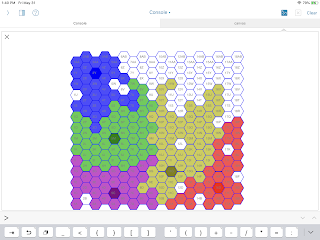
I'm able to draw a hex grid ("Flat Top", "Double Height") in a few dozen lines of code. This includes a bunch of geometry rules like adjacency and directional movement.
The Pythonista package includes a super-easy-to-use
Given a HexGrid instance, I can then create "cities" and their surrounding territories in an "empire". I've tried a few organic growth algorithms, and I like the look of these maps. They provide a lot of avenues for conflict for writing fiction or playing role-playing games.
Some of the algorithmic foundations: https://www.redblobgames.com/grids/hexagons/.
It's pretty slow. No surprise there. It's running on an iPad.
It's pretty easy to work on. Whip out the iPad and start coding.
The super-easy, built-in
I can see having an intro to programming class where the fee includes an extra $800 for the iPad you take home along with your new-found skills in basic coding. (This is still a *lot* of money, but it's less than a full laptop.)
However, there are still some "Edge" cases that are challenging.
Location 12D reflects a hole on a border. These are interesting, and could be the seed for epic wargaming, role-playing game, novel-writing drama. A simple algorithm can find these and assign a random owner... But... They really need a special "On Fire" color scheme to show the potential for drama.
There's a subtlety in the upper-left corner (5W and 6V) between Blue and Green. While these seem like simple border holes, each hole as only five of six required neighbors.
Compare these with 16P in the upper-right corner. This also has five of six neighbors. However, this space looks like it could be a bay leading up to a river and the river is a natural border between nations.
The head of the bay at 16P has 5 neighbors of two colors, similar to 5W and 6V. The difference can be detected by a recursive walk to see if a hole is connected to other holes and the composite is actually surrounded. There are lots of *edge* cases, but the (5W, 6V) pair seems to embody the next stage of surround detection.
This more nuanced algorithm design doesn't work out well in the Pythonista environment. This algorithm design requires careful unit tests, not the code-and-run cycle of hackery. For this kind of careful design, we'd need to leverage
If you're an iPad user, consider adding Pythonista. You can really write real Python. It's a useful environment. It's fun for teaching.
The Pythonista package includes a super-easy-to-use
canvas module that's a tiny bit simpler than turtle graphics. It takes a bit of getting used to, but it has enough graphics primitives to make it easy to create hexagons and tile the surface.Given a HexGrid instance, I can then create "cities" and their surrounding territories in an "empire". I've tried a few organic growth algorithms, and I like the look of these maps. They provide a lot of avenues for conflict for writing fiction or playing role-playing games.
Some of the algorithmic foundations: https://www.redblobgames.com/grids/hexagons/.
Fun Hackery
This is fun hackery because I can change the code, click the run icon, and watch the consequence of the changes. A traceback is highlighted in the original file. Easy. Fun.It's pretty slow. No surprise there. It's running on an iPad.
It's pretty easy to work on. Whip out the iPad and start coding.
The super-easy, built-in
canvas module means feedback is instant and gratifying.I can see having an intro to programming class where the fee includes an extra $800 for the iPad you take home along with your new-found skills in basic coding. (This is still a *lot* of money, but it's less than a full laptop.)
Filling in the Holes
Looking at the output, you can see the growth algorithm left some unfilled holes. A later version examines all unfilled spaces to see if they're entirely surrounded by one color and fills them. This is a fun algorithm because it works in a simple way with the adjacency iterator and the set of locations covered by a city. Locations 12L and 17K are these "Simply Surrounded Single Holes."However, there are still some "Edge" cases that are challenging.
Location 12D reflects a hole on a border. These are interesting, and could be the seed for epic wargaming, role-playing game, novel-writing drama. A simple algorithm can find these and assign a random owner... But... They really need a special "On Fire" color scheme to show the potential for drama.
There's a subtlety in the upper-left corner (5W and 6V) between Blue and Green. While these seem like simple border holes, each hole as only five of six required neighbors.
Compare these with 16P in the upper-right corner. This also has five of six neighbors. However, this space looks like it could be a bay leading up to a river and the river is a natural border between nations.
The head of the bay at 16P has 5 neighbors of two colors, similar to 5W and 6V. The difference can be detected by a recursive walk to see if a hole is connected to other holes and the composite is actually surrounded. There are lots of *edge* cases, but the (5W, 6V) pair seems to embody the next stage of surround detection.
This more nuanced algorithm design doesn't work out well in the Pythonista environment. This algorithm design requires careful unit tests, not the code-and-run cycle of hackery. For this kind of careful design, we'd need to leverage
doctest (or unittest) for testing. While I'd like pytest, that's a lot to ask for. For these kinds of apps, doctest is more than adequate, and a simple import doctest; doctest.testmod() in a scrip can help be sure things work as expected.tl;dr
If you're an iPad user, consider adding Pythonista. You can really write real Python. It's a useful environment. It's fun for teaching.
Tuesday, June 11, 2019
Circuit Python on the Gemma M0 -- The Red Ranger Beacon
PyCon 2018 Swag included a Gemma m0. (https://www.adafruit.com/product/3501)
PyCon 2019 Swag included a Circuit Playground Express. See https://learn.adafruit.com/adafruit-circuit-playground-express/circuitpython-quickstart.
Both of these are (to me) amazing. They mount as USB devices; there’s a code.py file that’s automatically run when the board restarts.
The Gemma has fairly few pins and does some real simple things. The CPX has a bunch of pins and ton of hardware on the board. Buttons, Switches, LED’s, motion sensor, temperature, brightness... I’ve lost count.
Few things are more frustrating than making a mistake and being unable to restore the original functionality as a check to be sure things are still working.
Also. At some point, you'll want to upgrade the OS on the chip. This will require you to have a bootable image. The process isn't complex, but it does require some care. See https://learn.adafruit.com/welcome-to-circuitpython/installing-circuitpython#download-the-latest-version-3-4 for downloading a new OS.
So. Step 1a. Create a local folder for your projects. Within that folder, create a folder for each project. Put the relevant code.py into the sub-folder. Like this
PyCon 2019 Swag included a Circuit Playground Express. See https://learn.adafruit.com/adafruit-circuit-playground-express/circuitpython-quickstart.
Both of these are (to me) amazing. They mount as USB devices; there’s a code.py file that’s automatically run when the board restarts.
The Gemma has fairly few pins and does some real simple things. The CPX has a bunch of pins and ton of hardware on the board. Buttons, Switches, LED’s, motion sensor, temperature, brightness... I’ve lost count.
Step 1 -- Get Organized
Create a proper project directory on your local machine. Yes, you can hack thecode.py file immediately, but you should consider making a backup before you start making changes.Few things are more frustrating than making a mistake and being unable to restore the original functionality as a check to be sure things are still working.
Also. At some point, you'll want to upgrade the OS on the chip. This will require you to have a bootable image. The process isn't complex, but it does require some care. See https://learn.adafruit.com/welcome-to-circuitpython/installing-circuitpython#download-the-latest-version-3-4 for downloading a new OS.
So. Step 1a. Create a local folder for your projects. Within that folder, create a folder for each project. Put the relevant code.py into the sub-folder. Like this
gemma
 ┣━━ baseline
 ┃   ┗━━ code.py
 ┣━━ my-first-project
 ┃   ┗━━ code.py
 ┣━━ another-project
 ┃   ┗━━ code.py
 ┗━━ os-upgrade
     ┗━━ other files...
See https://learn.adafruit.com/adafruit-gemma-m0/troubleshooting for additional help if you have a Windows PC.
A lot of folks like the Mu editor for this. https://codewith.mu.
I like using BBEdit. https://www.barebones.com/products/bbedit/. To make this work I *also* need to have
This is a lot of busy screen real-estate with three separate apps open. It's not for everyone. I like it because there's little hand-holding. You may prefer Mu.
It's important to go through the edit/download/play cycle many times to be sure you're clear on what code's on your PC and what code's on your board.
It's even more important to see how you're forced to debug syntax errors using the screen app until you invent a suitable mock library for off-line unit testing.
However.
It's also a very small processor, with very few pins, so you can't do anything super elaborate. You can, however, do quite a bit.
See Nina Zakharenko - Keynote - PyCon 2019 for some inspiration
Many thanks to @nnja for showing us some elegant, inspirational ideas.
Step 2 -- Start Small
Tweak a few things in the suppliedcode.py if you're new to IoT stuff.A lot of folks like the Mu editor for this. https://codewith.mu.
I like using BBEdit. https://www.barebones.com/products/bbedit/. To make this work I *also* need to have
- a terminal window open so I can use the Mac OS screen application, and
- a finder window open to copy the code.py from my PC to the Gemma M0.
This is a lot of busy screen real-estate with three separate apps open. It's not for everyone. I like it because there's little hand-holding. You may prefer Mu.
It's important to go through the edit/download/play cycle many times to be sure you're clear on what code's on your PC and what code's on your board.
It's even more important to see how you're forced to debug syntax errors using the screen app until you invent a suitable mock library for off-line unit testing.
Step 3 -- Plan Carefully
The version of Python is remarkably complete.However.
It's also a very small processor, with very few pins, so you can't do anything super elaborate. You can, however, do quite a bit.
See Nina Zakharenko - Keynote - PyCon 2019 for some inspiration
Step 4 -- Check This Out
https://github.com/slott56/gemma-boat-beaconMany thanks to @nnja for showing us some elegant, inspirational ideas.
Subscribe to:
Posts (Atom)